
General
The General tab in the Account Detail Screen contains information about the account as shown below.
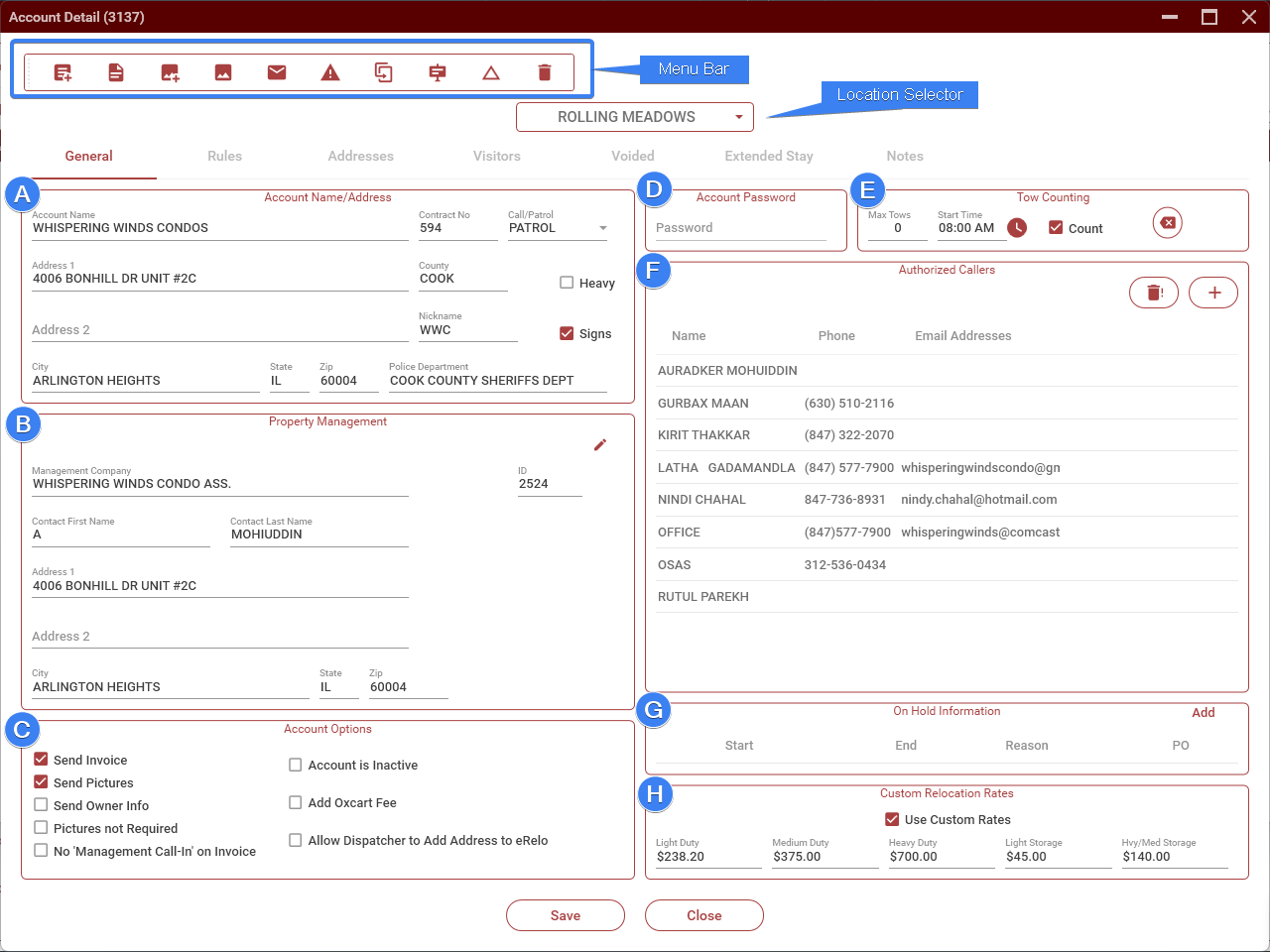
Section A - Contains the name and address of the account.
- The Contract Number is automatically generated when the account is created. This cannot be changed.
- The Nickname allows you to create a short nickname for an account. This can then be used anywhere that you need to enter an account,
- Call/Patrol marks whether an account is a call or patrol account.
- The Heavy and Signs checkboxes are not used and can be ignored.
Section B - Property management information.
- Contains the name and address of the property management company.
- The information in this section is not editable. To update the information for a property management company, you must do this from the Main Screen->Prop Mgmt.
- To change the property management company for an account, click on the pencil icon in the upper-right of the panel.
Section C - Account Options
- Send Invoice: When checked, will prompt the dispatcher to email the invoice to the account when printing.
- Send Pictures: When checked, will prompt the dispatcher to email pictures to the account when printing.
- Send Owner Info: When checked, will prompt the dispatcher to email the owner info to the account when releasing the vehicle.
- Pictures Not Required: When checked, will not show the pictures required outline in the vehicle list on the Main Screen. This is usually only used for accounts that are on the parking software.
- No 'Management Call-In' on Invoice: When checked, will display 'No management call-in' under the reason for any tow for this account.
- Account is Inactive: Checking this will mark the account as no longer active and will no longer appear in drop-down lists. This should only be set when an account cancels their service with us.
- Add Oxcart Fee: This is no longer used.
- Allow Dispatcher to Add Address to eRelo: When checked, will allow the dispatcher to add an address to an account when entering a tow. This should only be used when eRelocator numbers are not required, such as areas that are not regulated by the ICC.
- Group ID (not shown in image above): Use this to group accounts. When entering a do-not-tow for a grouped account, the do-not-tow will automatically be added to all the accounts in that group. Click on the plus button to get the next available group ID.
Section D - Account password
This is the password that has been set by the account. When taking a management request, the caller should be asked for the password.
Section E - Tow Counting
When set, this monitors how many cars have been towed from the account for the night and posts the running total on Slack. See Tow Counting.
No comments to display
No comments to display