
Email/Save Visitor List
This allows you to save or email a visitor list. Access this from the Email/Save Visitor List item in the Visitor Call-Ins Menu.
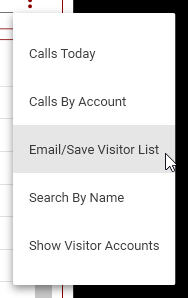
You will be taken to the Save/Email Visitor List screen.
Save as a PDF
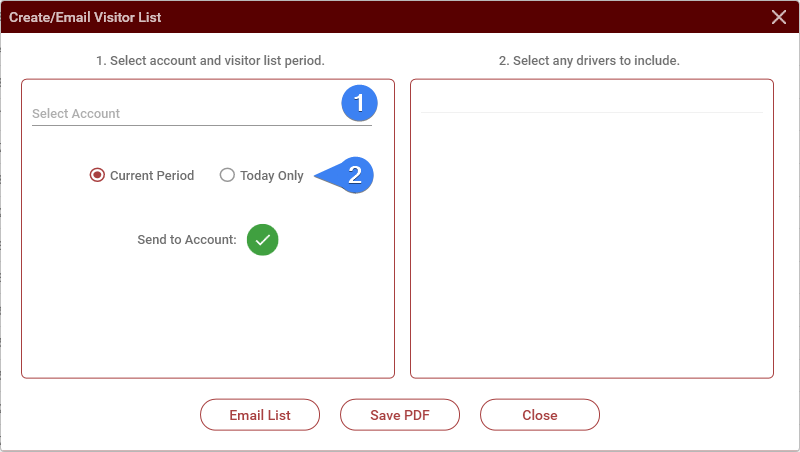
- Select the account.
- Select the period, either all calls for the current period, based on the visitor call-in settings for the account, or just calls for the current day.
- Click on Save PDF. A save file dialog will open where you can select a download location for the PDF.
Email Visitor List
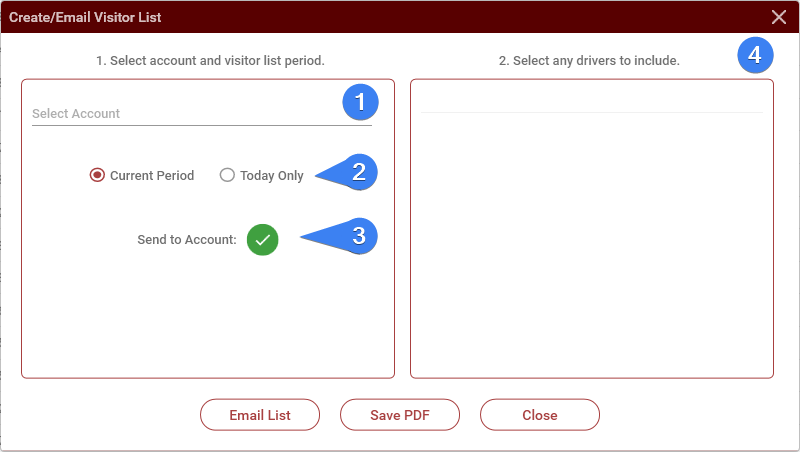
- Select the account.
- Select the period, either all calls for the current period, based on the visitor call-in settings for the account, or just calls for the current day.
- Select whether to send this list to the account (selected by default). Deselect to send to selected drivers only.
- Select any drivers that you want to include
- Click on Email List. The list will be emailed to the account and any selected drivers.
No comments to display
No comments to display