
Tow Detail
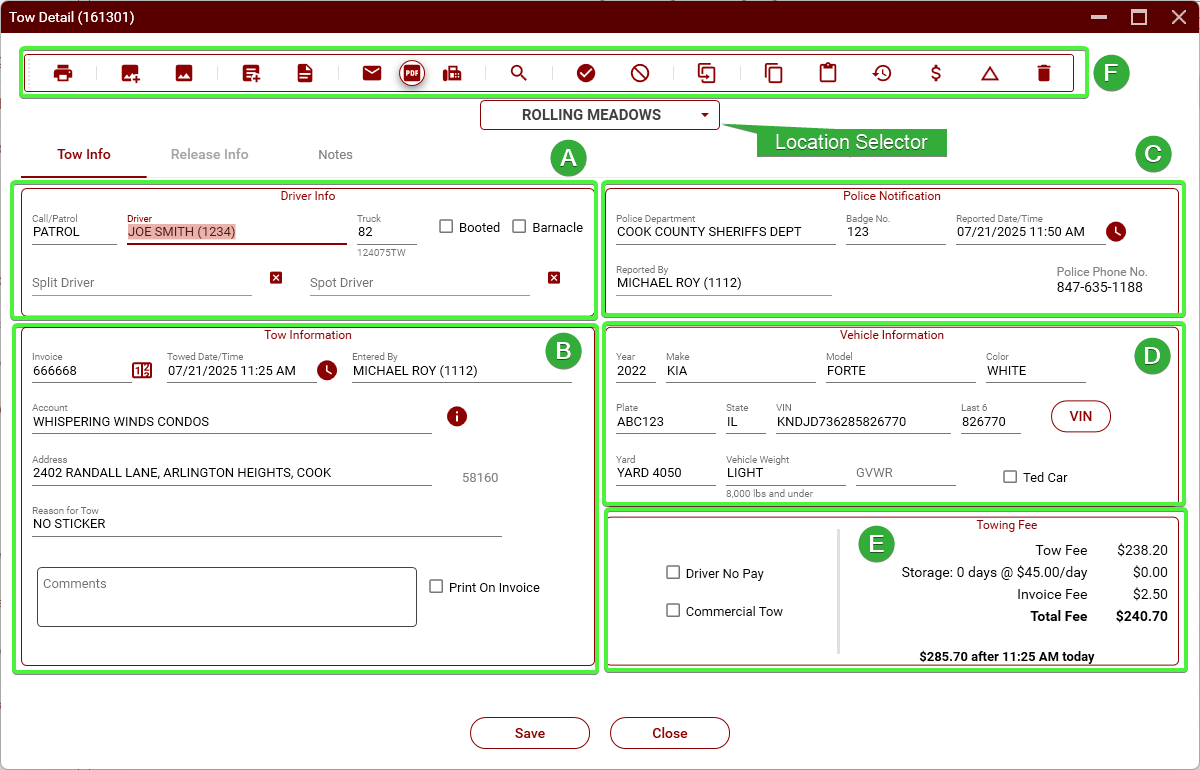
-
Section A - Driver Info
-
Call/
Patrol.Patrol – Selects the type of tow. When a tow is started by clicking "NewTow,Tow," this will default toPATROL.PATROL.WhenIfstartedinitiated from a tow request, it will default toCALL.CALL.CanThis can be changed asnecessary.needed. -
Driver
.– Select the tow truck driver. -
Truck
.Select– Choose the tow truck number. If the selected driver has atowtruck assigned tohim, this will automatically be populated when you select the driver.them (Seesee Truck Assign)., it will auto-fill here. -
Booted – Check this box if the vehicle was booted rather than towed.
-
Barnacle – Not used.
-
Split Driver
.– Select a second driverwhenifatwo drivers are sharing the towis(e.g.,beingforsplitcommissionbetweensplit).two drivers. -
Spot Driver
.This–is usedUsed whenanotherone driverisspottedgetting credit for spotting athe vehicletobutbeanothertowedperformed the tow (usuallyaforheavy)heavy tows). Booted. Check this box when a vehicle is booted, rather than being towed.
-
Section B - Tow Information
-
Invoice.Invoice – This is the ICCInvoiceinvoice number.ThisIt will be automatically generated whenyou startatow,newbuttowyouisshouldcreated.alwaysAlwayscheck to make sureverify thenumbersnumbermatch.is correct. -
Towed Date/Time
.– This is the date and timethatthe driverwashookedwiththe vehicle. -
Entered
By.ByThis–is the nameName of the dispatcherthatwho entered the tow.This will be automatically populatedAuto-filled but can be changed ifneeded.necessary. -
Account
.This–is theThe name of the accountwhere(property or business) from which the vehicle wastowedtowed.from. -
Address.Address – Theaddresslocation the vehicle was towed from.YouMustmustbe an address within TRIP. If the exact address isn't available, useanthe nearest address that is in TRIP. -
Reason for Tow
If– The reason that theactualvehicleaddresswasistowed. You should use one of the reasons that are in TRIP. -
Comments – Additional notes or special circumstances related to the tow.
-
Print On Invoice – If checked, the comment will appear on the printed invoice.
Section C - Police Notification
-
Police Department – Select the department that was notified about the tow.
-
Badge No. – The badge number of the officer or dispatcher who took the call.
-
Reported Date/Time – Date and time when the tow was reported to the police.
-
Reported By – The dispatcher who made the police notification.
-
Police Phone No. – Phone number for the police department on record.
Section D - Vehicle Information
-
Year – Vehicle model year.
-
Make – Manufacturer (e.g., KIA).
-
Model – Specific model (e.g., FORTE).
-
Color – Vehicle color.
-
Plate – The license plate number.
-
State – The issuing state of the license plate.
-
VIN – Vehicle Identification Number. Click the red "VIN" button to verify the vehicle information from the VIN.
-
Last 6 – Last 6 digits of the VIN for quicker identification.
-
Yard – The storage yard the vehicle was taken to.
-
Vehicle Weight – Used to classify tow type. Defaults to "8,000 lbs. and under" for passenger vehicles.
-
GVWR – Gross Vehicle Weight Rating. Must be entered for medium and heavy tows. Enter the number only, no comma or extra characters.
Section E - Towing Fee
-
Tow Fee – Standard fee charged for the tow itself.
-
Storage – Calculated as days × daily storage rate.
-
Invoice Fee – Additional fixed fee (e.g., $2.50) added to light-duty tows (medium and heavy are not
inchargedTRIP,thisusefee). -
Total Fee – Sum of all charges (Tow + Storage + Invoice Fee).
-
Estimate After Today – Shows projected total cost after additional storage time if not picked up the
closestsameaddress.day. -
Driver No Pay – If checked, this tow will not count toward driver compensation.
-
Commercial Tow – Not used.
-